4.1. How the ERP works
Phoenix embarked upon the path of ERP in 2019. While we could not proceed at the pace as much as we desired, we are making progress in the right direction. We have been conducting series of training programs to all the stakeholders.
In this document we would like to touch upon few fundamental aspects behind “Strategic ERP”, off the shelf yet customised ERP tool adopted by Phoenix for implementation of ERP.
The ERP platform used by Phoenix revolves around Project Engineering Module. The intelligence of the ERP revolves around integration of two core data sets and this becomes the basis for further functioning of ERP. These are
(a) Schedule and
(b) Work break down Structure or WBS (i.e.priced BOQ)
The schedules are normally planned and tracked based on sequence of activities from start of the project till completion. The WBS are group of similar activities grouped together for unit pricing to arrive at overall budget.
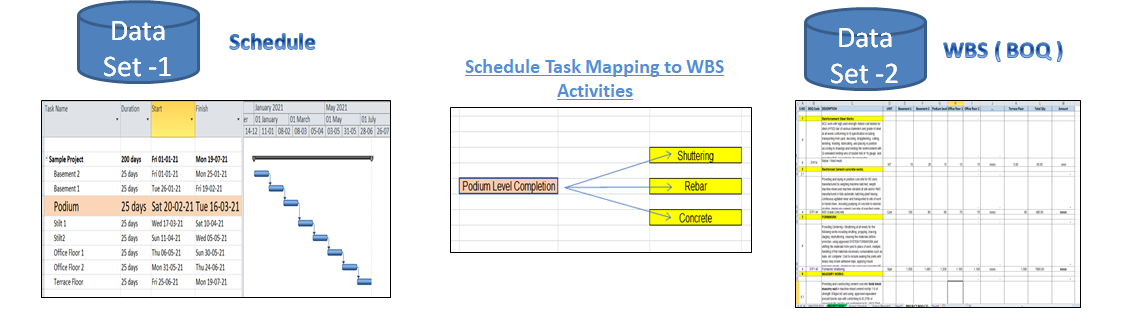
For example, casting of podium slab is one of the schedule activities and this work involves say rebar, shuttering and M30 concrete. Unless all these three activities to the desired quantum is not completed, the podium slab activity is not completed. In a typical schedule what one could see is a simple one line “Casting of podium slab” starting on x date and ending on y date but would not have the list of activities involved with in that as described above.
On the other hand, if we look at WBS, it would have various activities for the project as a whole, volume of work to be executed and unit rate agreed with the contractor. So, Rebar, Shuttering and M30 concrete would appear as the line item but one cannot see where all these items are intended to be used and especially quantities required for podium slab.
If the schedule is tracked by sequence of construction activities and WBS are tracked by type of billable activities, no way, one can at a point find out the progress of the work based on the billing or value of the work completed, based on schedule.
So, it is necessary that these two viz. schedule and WBS are linked at the fulcrum of the ERP. To achieve this, we break down the WBS line items into identifiable project locations which are similar to the line items appearing in the schedule. So, in our example, the M30 concrete quantities in normal WBS would be one single item but in reality, it would be used in say 20 different physical locations. So, we break down this (M30 concrete) WBS line item into 20 sub line items and one of them would be podium slab. Such exercise is carried out for all the WBS line items.
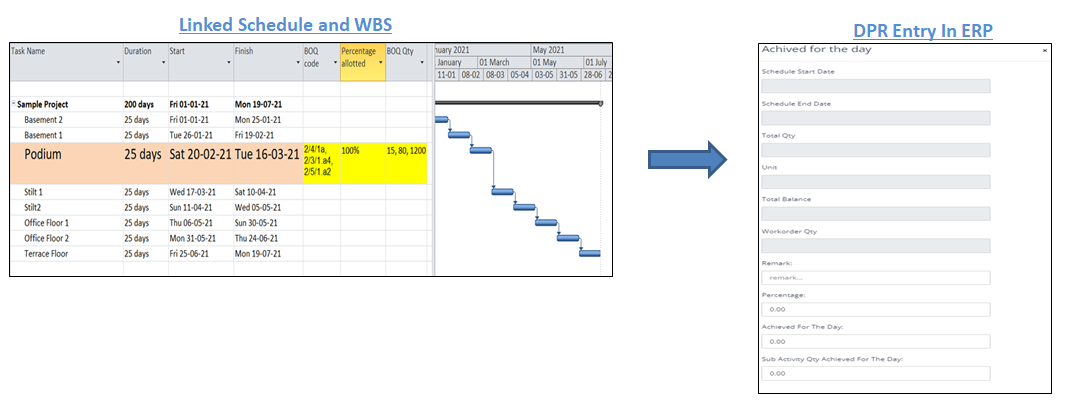
In the next step, we assign the WBS (BOQ)code to each of the line items of the schedule. Using the codes, we cross link the schedule with relevant codes of WBS line items applicable for each of the schedule line item and similarly for each of the WBS line item we cross link the same with schedule line item applicable for each WBS line item. The activity line items of the schedule are assigned the relevant BOQ codes and hence the BOQ quantity gets linked to that particular activity line item. So, in our example above, the podium slab as the schedule line item would have the codes of Rebar, Shuttering and M30 concrete from WBS and % of quantum applicable for this task. On the other hand, if we look at say Rebar in WBS, it would have podium slab as one of the sub items with quantity attributable for that activity.
Finally, when we track the daily progress report which are based on schedule line items, the ERP will capture the corresponding value from the WBS based on above linkages and provide us the value of work completed and also the certification of works.
This is a very unique approach however a sound and robust way of tracking the progress. As said, since the business is about construction and delivery of commercial office space and the goals of the construction department is delivery of the building as per the schedule and in the budget, the above philosophy of the ERP matches the way Phoenix is organised in achieving the business goals.
4.2. Usage of forms
The next aspect of the ERP is data inputs. Unlike other ERP, Strategic ERP uses certain forms to feed the data into the system. There are in all 32 forms relevant for us in the overall ERP and these are divided into following modules.
List of ERP Modules and forms used